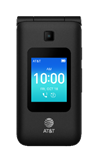
Airplane mode will disable all wireless services on the device. Calls, data, and text messages cannot be sent or received. Disable Airplane mode to restore regular device function.
In this tutorial you will learn how to:
• Turn Airplane mode on or off from Quick Settings
• Turn Airplane mode on or off through Settings
When Airplane Mode is turned on, the  Airplane mode icon will display in the Notification bar.
Turn Airplane mode on or off from Quick Settings
From the home screen, press the up button to access Quick settings. Press the navigational buttons to highlight the Airplane mode icon, then press the OK button to turn on or off as desired.
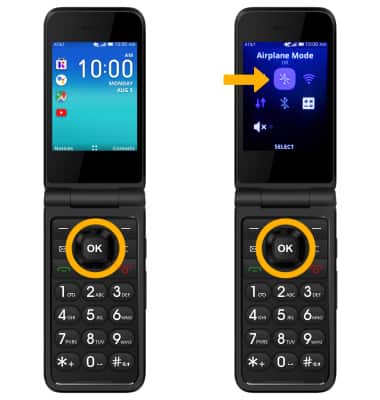
Airplane mode icon, then press the OK button to turn on or off as desired.
Turn Airplane mode on or off through Settings
1. From the home screen, press the OK button to access the Apps tray. Press the navigational buttons to highlight the  Settings app, then press the OK button to select.
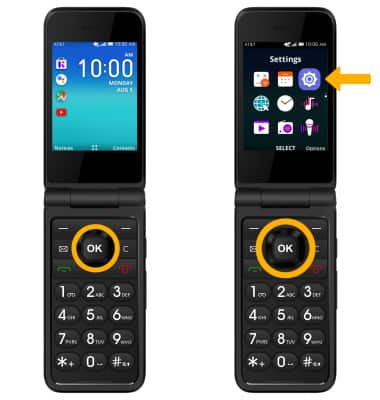
Settings app, then press the OK button to select. 2. From the Network & Connectivity tab, press the OK button to select Airplane Mode. Press the up button to highlight On, then press the OK button to select.
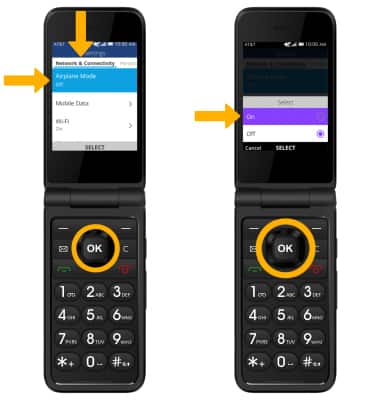
3. To disable Airplane mode, from the Network & Connectivity tab press the OK button to select Airplane Mode. Press the down button to highlight Off, then press the OK button to select.
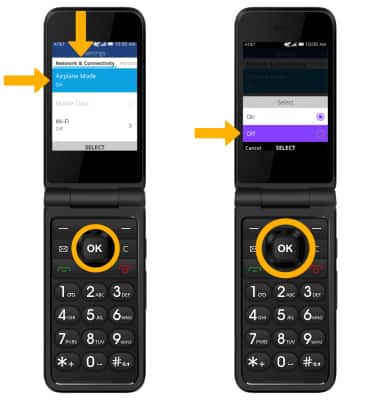
3. To disable Airplane mode, from the Network & Connectivity tab press the OK button to select Airplane Mode. Press the down button to highlight Off, then press the OK button to select.