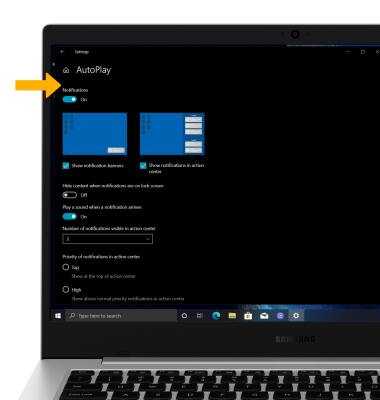
In this tutorial, you will learn how to:
• Access notification settings
• Turn lock screen notifications on or off
• Turn notifications on or off on a per-app basis
• Turn lock screen notifications on or off
• Turn notifications on or off on a per-app basis
Access notification settings
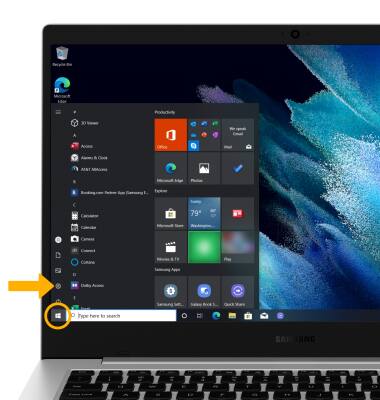
1. From the home screen, click the Start icon then click the Settings icon.
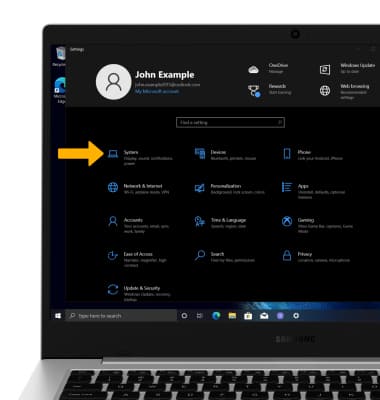
2. Click System.
3. Click the Notifications & actions tab, then edit notification settings as desired.
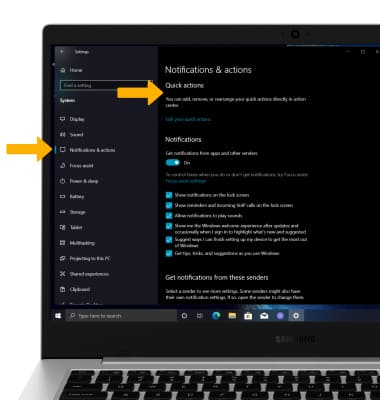
2. Click System.
3. Click the Notifications & actions tab, then edit notification settings as desired.
Turn lock screen notifications on or off
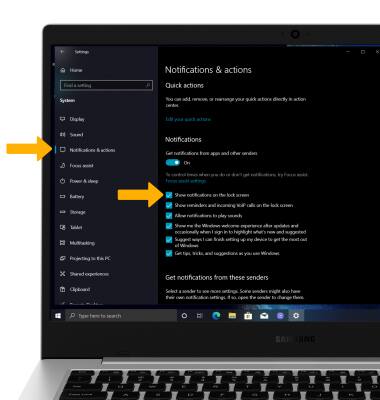
From the System screen, click the Notifications & actions tab then click the Show notifications on the lock screen checkbox.
Turn notifications on or off on a per-app basis
1. From the System screen, click the Notifications & actions tab then click scroll to and click the desired app.
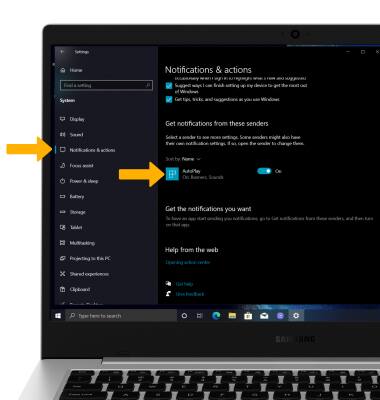
2. Edit notification settings as desired.
2. Edit notification settings as desired.