Assigning a unique ringtone to a contact
Pixel 8a
Assigning a unique ringtone to a contact
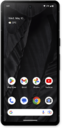
Give your contacts unique ringtones and other personal information.
1.
From the Contacts app main screen, select the contact you'd like to assign a ringtone to.
2.
Scroll to and tap Contact ringtone.
3.
Select the folder you would like to choose a ringtone from.
4.
Select your desired ringtone.
5.
Tap Save.
6.
You've completed the steps!
