Using Control Center
Using Control Center
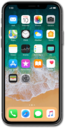
From the Home screen, drag down from the top right portion of your screen.
If your device has a Home button, swipe up from the bottom of your screen to access the Control Center.
Tap the Flashlight icon to turn on your flashlight.
Press and hold the Flashlight icon to view different brightness settings.
Tap outside of the Brightness meter to return to the Control Center.
Tap the Flashlight icon again to turn off your flashlight.
Press and hold the Timer icon to view Timer quick settings.
Tap outside of the Timer meter to return to the Control Center.
Press and hold the Camera icon to view Camera shortcuts.
The shortcuts shown here may be different than the ones shown on your device.
Tap outside of the Camera shortcuts to return to the Control Center.
Slide the Sound meter up or down to adjust iPhone volume.
You've completed the steps!
