Static IP
Nighthawk M7 Pro (MR7400)
Static IP
Learn how to set up a Static IP address.
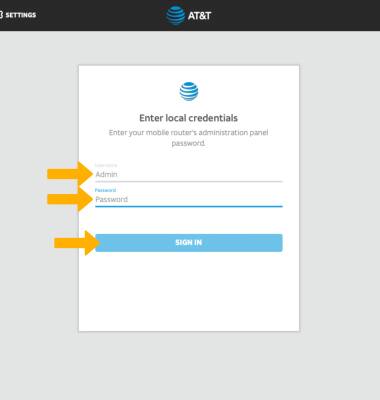
1. From your device's web browser, go to http://attwifimanager or type 192.168.1.1 into the search bar. Enter your Username and Password, then select SIGN IN.
Note: Ensure that your device is connected to the Netgear Nighthawk's Wi-Fi network. For more information, please see the Connect Devices to Wi-Fi or Connect PC or Mac to Wi-Fi tutorials.
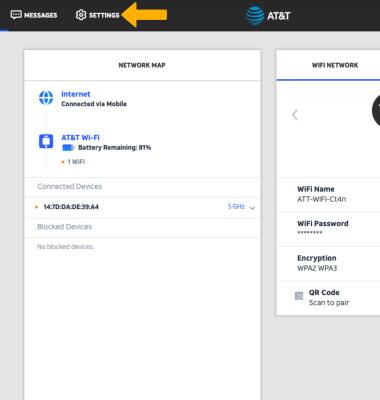
2. Select Settings at the top of the page.
3. Select Advanced, then select Mobile Router Setup.
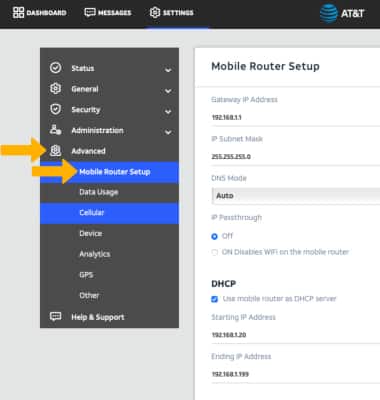
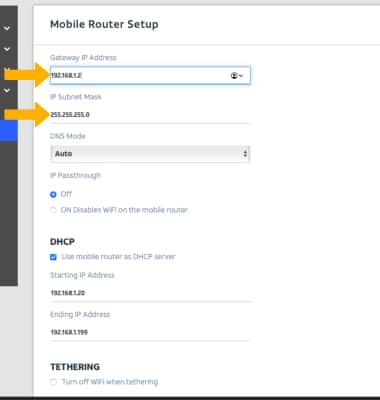
4. Enter the Gateway IP Address and IP Subnet Mask.
Note: Select Apply to confirm.