Switching phone numbers for an SMS or MMS message
iPhone SE (2nd generation)
Switching phone numbers for an SMS or MMS message
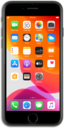
With the dual sim feature of your device, you can easily switch between phone numbers when sending an SMS or MMS message.
1.
From the Home screen, tap the Messages icon.
2.
Tap the Compose icon.
3.
Enter a contact's name.
You can also enter a phone number that is not in your contacts.
4.
Select the contact.
5.
Select the cellular plan label at the top of your screen.
The labels you've chosen may differ from this tutorial, but the same steps should still apply.
6.
Select the number you'd like to use.
7.
Tap the return key.
8.
Compose your message.
9.
Tap the Send icon.
10.
You've completed the steps!
