 To access Visual Voicemail, you must have already
  Phone app from the home screen > select and hold the 1 key > if prompted, enter your voicemail password > follow the prompts to listen to your messages. If you have forgotten your existing voicemail password, you will not be able to access voicemail until you
 In this tutorial, you will learn how to:
• Access & listen to a voicemail
• Access voicemail options
• Access voicemail options
When a new voicemail is received, the  Voicemail icon will appear in the Notification bar.
Voicemail icon will appear in the Notification bar.
Access & listen to a voicemail
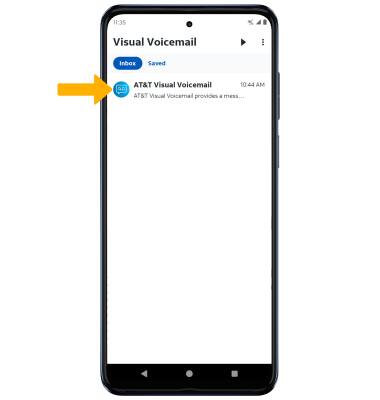
ACCESS: From the home screen, swipe up from the center of the screen to access the Apps tray then scroll to and select the  Visual Voicemail app.
LISTEN: Select the desired voicemail message.
Visual Voicemail app.LISTEN: Select the desired voicemail message.
Access voicemail options
Select the corresponding icon.
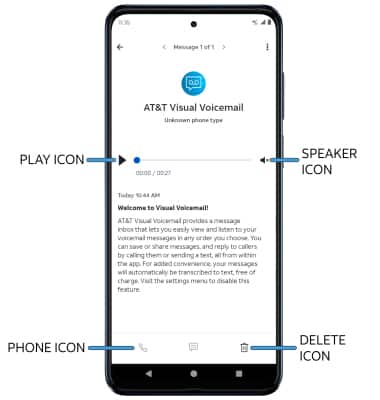
• CALL BACK: Select the Phone icon to call back the phone number.
• PLAY/PAUSE: Select the Play icon to play the message. Select the Pause icon to pause the message.
• DELETE: Select the Delete icon to delete a voicemail.
• SPEAKER: Select the Speaker icon to enable or disable speaker mode.
ADDITIONAL OPTIONS: From the desired voicemail, select the
 Menu icon then select the desired option.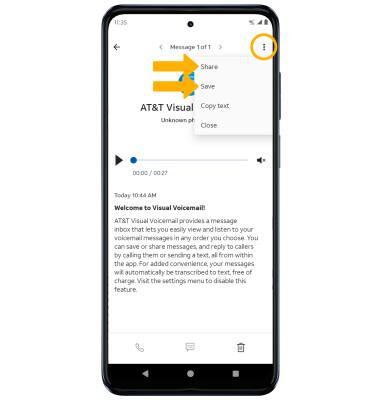
• SHARE: Select Share to share the voicemail.
• SAVE: Select Save to save the voicemail to your device.
Note: View Access voicemail messages for tips to manage your voicemail. Go to Troubleshoot Voicemail for solutions to common voicemail problems.
• SAVE: Select Save to save the voicemail to your device.
Note: View Access voicemail messages for tips to manage your voicemail. Go to Troubleshoot Voicemail for solutions to common voicemail problems.