
In this tutorial, you will learn how to:
• Log in to NumberSync
• Log out of NumberSync
With AT&T NumberSync™, once you sync devices to your smartphone number, you can make and receive voice or video calls from whatever device you choose. Video calls require an AT&T Video Call-capable smartphone. Your smartphone number will display on the call recipients caller ID. Certain restrictions, requirements or limitations may apply. Visit NumberSync Support or att.com/numbersync for more details.
Log in to NumberSync
 Phone app.
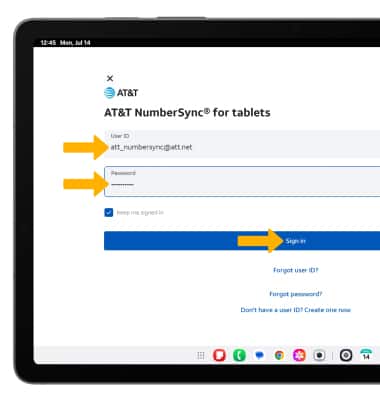
 2. Enter your myAT&T User ID and Password for the smartphone number you would like to sync with your tablet, then select Sign In.
Note: Review the Let's make sure it's you prompt, then select Send. A text message will be sent to the number linked with your User ID. Enter the 6-digit code to complete the log in process.
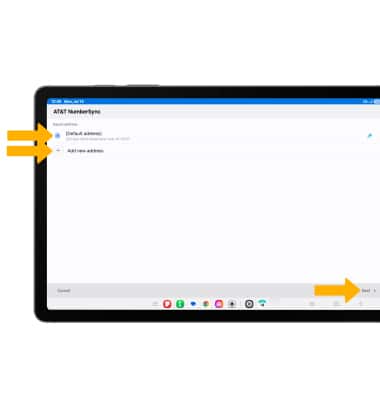
3. Select the desired emergency address then select Next, or select Add new address and follow the prompts.
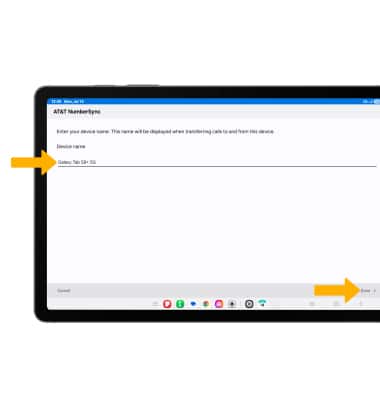
4. Enter a device name, then select Done.
Note: Visit NumberSync for Tablets for more information. For information on how to make and receive calls from your tablet, see the Call Features and AT&T Video Call tutorials.
Log out from NumberSync
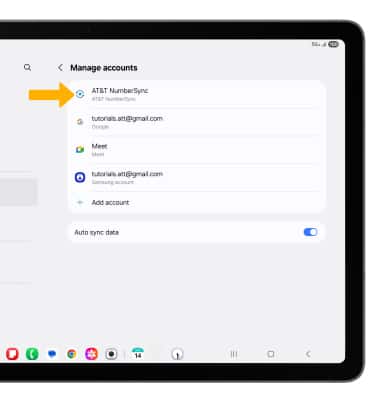
 Settings icon. Scroll to and select Accounts and backup, then select Manage accounts.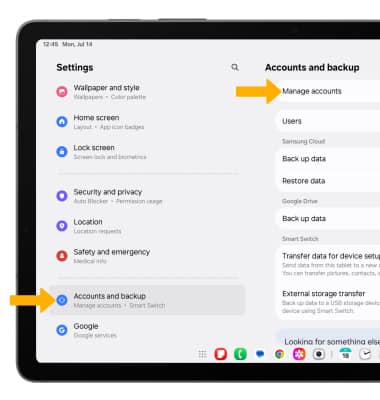
2. Select AT&T NumberSync.
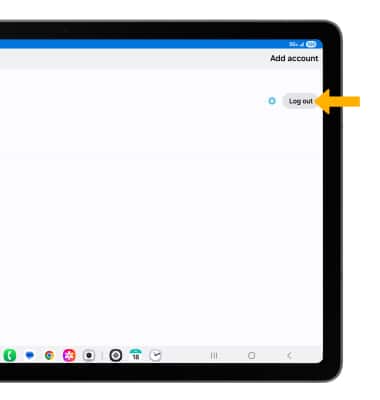
3. Select Log out.
Note: You will be prompted to select OK to confirm.
NumberSync for Android tablets requires smartphone set up for HD voice on AT&T postpaid wireless account & compatible tablet. To use NumberSync for video calls on tablet, phone must be video call capable.
Device Limit: Sync up to 5 tablets.
Charges: When tablet not connected to Wi-Fi, data usage rates apply to voice & video calls on tablet. International calls sent on tablet incur charges consistent with phone’s rate plan or international package.
Roaming: Cannot use NumberSync outside US, PR, or USVI.
Calls via NumberSync cannot be used with TTY & will not support 911 TTY calls. Visit http://att.com/numbersync for more information about 911 services, TTY, and progress with RTT.