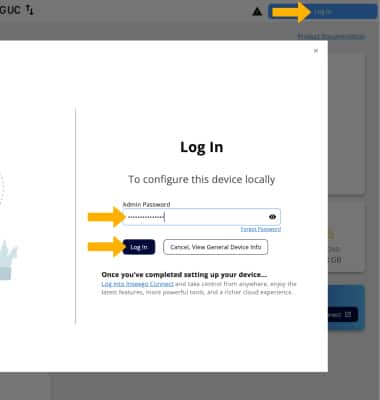
1. If you have multiple SIMs installed in your device, the Inseego Wavemaker FX4200 will automatically choose the SIM with the best connection to transmit your Wi-Fi network. If one SIM loses its connection, the device will switch to the secondary SIM. These settings are enabled by default. To edit these settings, from your device’s web browser, go to http://inseego.local or https://192.168.1.1. Click Log In. Enter your admin password, then click Log In.
Note: Ensure that your device is connected to your device's Wi-Fi network. For more information, please see the Connect Devices to Wi-Fi or Connect PC or Mac to Wi-Fi tutorials. If this is your first time logging into the Web admin page, the default password will be displayed on the bottom of your device. You will be prompted to change the admin password.
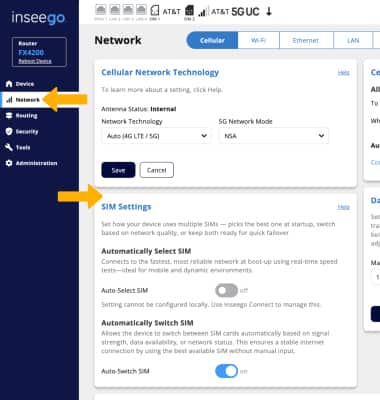
2. Click Network, then scroll to the SIM settings section. Click the desired switch(es) to enable or disable the desired setting.