
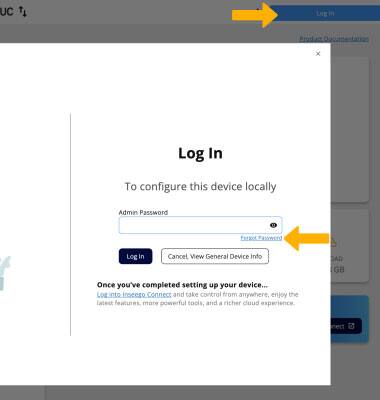
ANSWER SECURITY QUESTION: 1. From your connected device's web browser, go to http://inseego.local or https://192.168.1.1. Click Log In. If you forget your Inseego Wavemaker FX4200 Password to the Admin Web Page, click Forgot Password.
Note: Ensure that your device is connected to the Inseego Wavemaker FX4200's Wi-Fi network. For more information, please see the Connect Devices to Wi-Fi or Connect PC or Mac to Wi-Fi tutorials. If you haven’t logged into the Web admin page before, the default password will be displayed on the bottom of the device. You may be prompted to change the admin password.
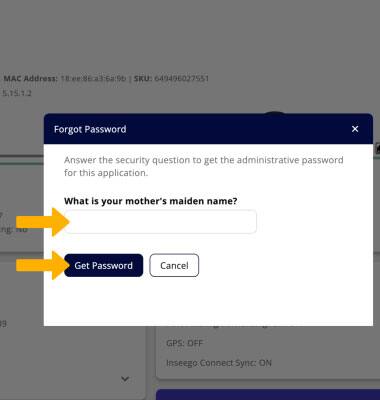
2. Enter the answer to your security question, then click Get Password.
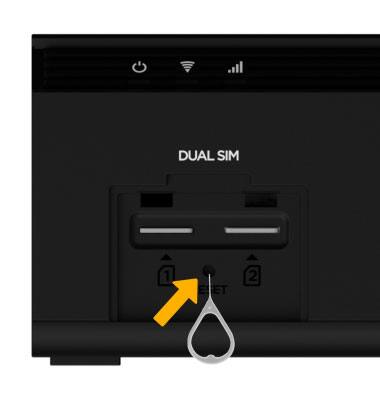
RESET DEVICE: If you forget the answer to your security question, you will have to perform a factory reset. A factory reset will erase all configuration settings and put the device back to its factory state. On the Inseego Wavemaker FX4200, remove the SIM lot cover. Use a SIM Tool to press and hold the Reset button the below the SIM slots. The Inseego Wavemaker FX4200 will take a moment to reset. After resetting the password to the Admin Web Page will be the password on the bottom of the Wavemaker FX4200.