• View data usage
• Turn data on/off
• Turn data on/off
View data usage
Dial *data# (*3282#) on your mobile phone, then press the OK key to check your current bill cycle's data usage. Press the OK key again.
Note: A message will be sent to your phone. For information about how to view messages visit the Send & Receive Messages tutorial.
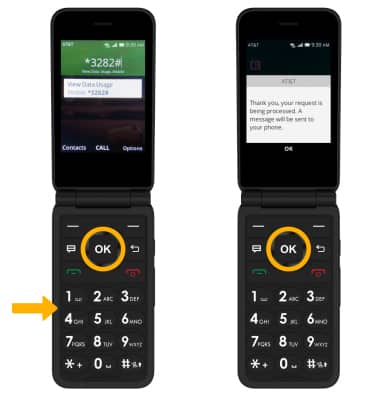
Note: A message will be sent to your phone. For information about how to view messages visit the Send & Receive Messages tutorial.
Turn data on/off
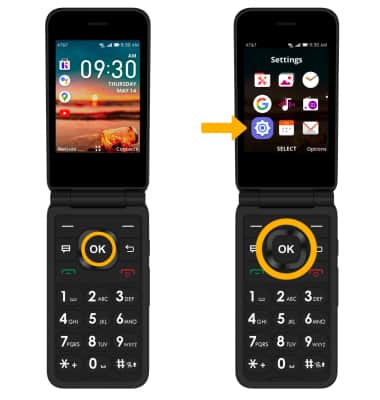
1. From the home screen, press the OK key to access the Apps tray. Press the navigational buttons to highlight the Settings app, then press the OK key to select.
2. Press the right or left button to navigate to the Network & Connectivity tab. Push the down button to highlight Mobile data, then press the OK key to select.
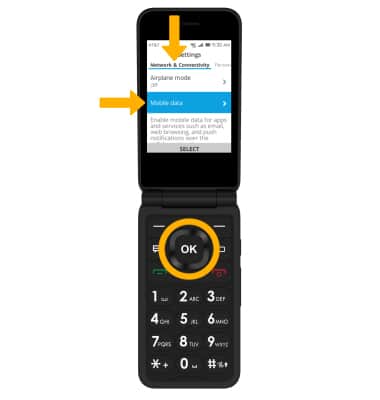
3. Ensure that Mobile data is highlighted, then press the OK key to select. Press the up or down button to highlight the desired option, then press the OK key to select.
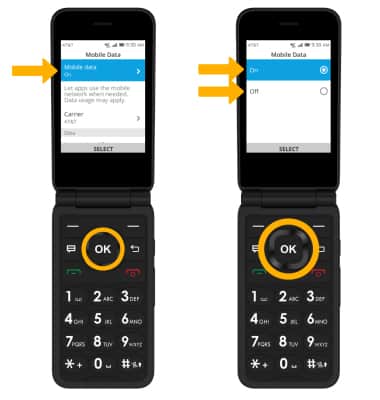
2. Press the right or left button to navigate to the Network & Connectivity tab. Push the down button to highlight Mobile data, then press the OK key to select.
3. Ensure that Mobile data is highlighted, then press the OK key to select. Press the up or down button to highlight the desired option, then press the OK key to select.