Deals
iPhone deals
Samsung Galaxy deals
Holiday deals
Business employee
55+
Military
Active first responders
Retired responders
Nurses & physicians
Teachers
Union
Credit card
&More Benefits
Explore wireless
Phone plans
New phones & devices
Upgrade
Bring your own phone
Add a Line
Switch and save
Trade in your device
International phone plans
Shop new iPhones
Shop Certified Pre-Owned
iPhone 17
Samsung Galaxy S25
Why AT&T Wireless
Wireless help
More resources
Explore home internet
Internet plans
Fiber internet
Home Wi-Fi
Check availability
AT&T Internet Air
Moving services
Bundles
Gaming
Home business
Internet help
Speed test
More resources
Access from AT&T
Explore AT&T PREPAID
Prepaid plans
Prepaid phones
Bring your own phone
Prepaid deals
Prepaid account
Activate your service
Lease-to-Own
Home Phone Services
AT&T Phone
AT&T Phone – Advanced
Landline Phone
Lifeline
Phones & accessories
Digital phone help
Landline phone help
Bundles
Internet + Wireless
Internet + Phone
Home office
Smart watches & devices
Smart home
In-car Wi-Fi
All accessories
Headphones
Phone & tablet cases
Chargers
Screen protectors
Speakers & smart home
Internet & TV equipment
PopSockets & more
Gadgets & gaming
Accessory deals
AT&T RADIANT Max (U705AA)

NFC

Learn how to turn NFC on and off.

INSTRUCTIONS & INFO
NFC is a wireless technology that allows your device to communicate by touching, or being in close proximity to, other NFC devices or tags.

In this tutorial, you will learn how to:

• Turn NFC on or off
• Share content with another NFC enabled device


Turn NFC on or off

1. Swipe down from the Notification bar with two fingers then select the settings Settings icon. 

2. Select Connected devices > Connection preferences > NFC. 

Note: Review the How to use NFC prompt, then select GOT IT. 
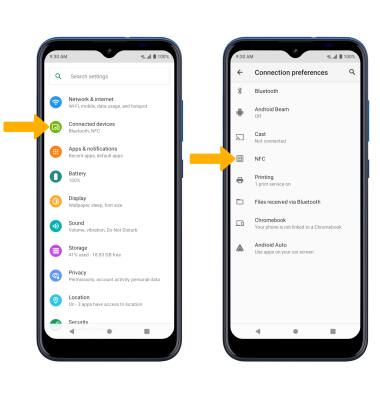
Image 1


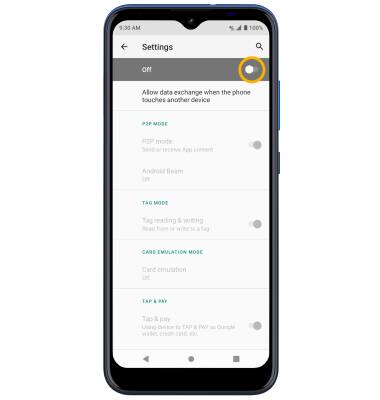
3. Select the NFC switch. 

Image 2

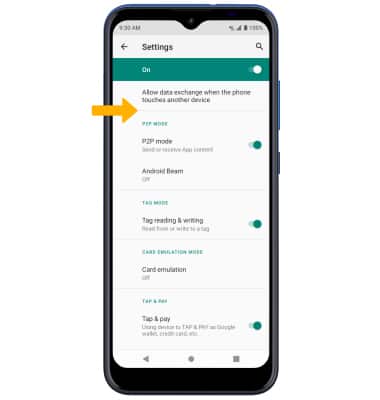
4. Edit settings as desired.

Image 3

5. When enabled, the nfc NFC icon will be displayed in the Notification bar. 


Share content with another NFC enabled device

Place the back of your phone against the NFC reader of an NFC enabled device to make payments, share data, and read or write NFC tags. 


Did you get the help you needed?


Did you get the help you needed?