Mobile Hotspot
Mobile Hotspot
When Mobile Hotspot is enabled, the

Mobile hotspot icon will be displayed in the Notification bar.
Turn mobile hotspot on/off
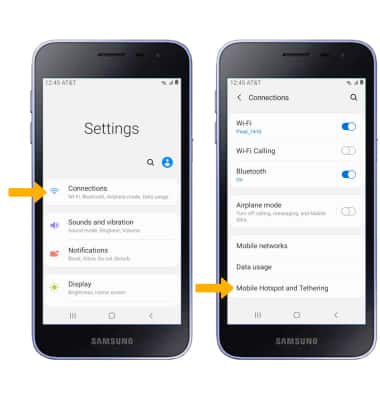
- Swipe down from the Notification bar, then select the
 Settings icon.
 - Select the Connections, then select Mobile Hotspot and Tethering.
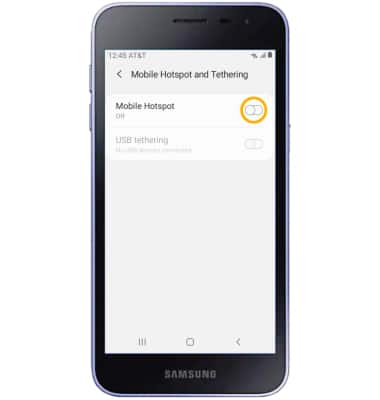
3. Select the Mobile Hotspot switch.
Note: If Wi-Fi is turned on, you will be prompted to select Turn off. Upon first use, you will be prompted to change the Mobile Hotspot password. Enter the desired password, then select SAVE.
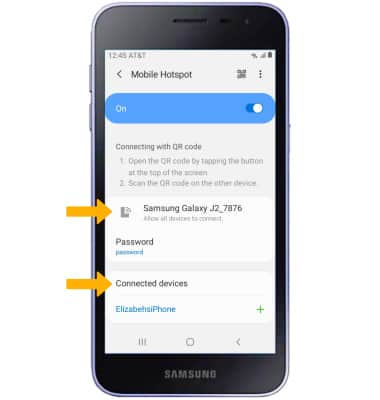
View mobile hotspot network name & connected devices.
1. From the Mobile Hotspot and Tethering screen, select Mobile Hotspot.
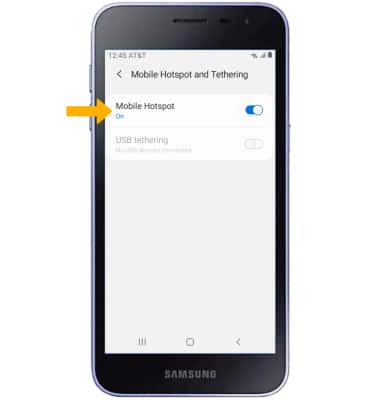
2. The Mobile Hotspot Network name and Connected deviceswill be displayed.
Configure hotspot settings
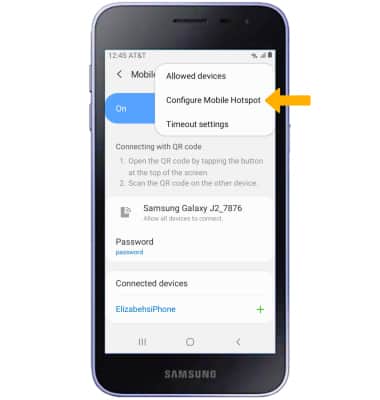
1. From the Mobile Hotspot screen, select the  Menu icon then select Configure Mobile Hotspot.
2. Edit the desired information, then select Save when finished.
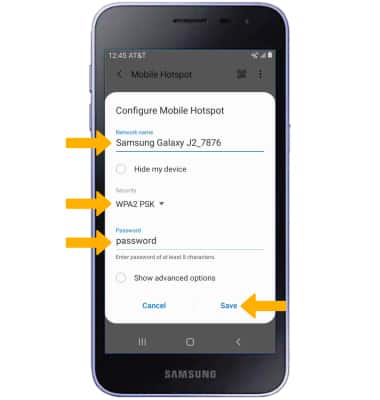
• NETWORK NAME: Change the name of the Mobile Hotspot network.
• SECURITY: Change the Security type of the Mobile Hotspot network.
• PASSWORD: Change the Password of the Mobile Hotspot network.