Insert or Remove SIM & Memory Card
Insert or Remove SIM & Memory Card
A SIM card may already be inserted. For help activating a new SIM card, visit Activate and Use Your Device. MicroSD/memory cards expand the storage capacity of device and are sold separately. This device can use a microSD card up to 1024 GB.
In this tutorial, you will learn how to:
• Locate SIM tray
• Insert or remove SIM & microSD card
The  No SIM icon will be displayed in the Notification bar when there is no SIM card in the device.
Locate SIM tray
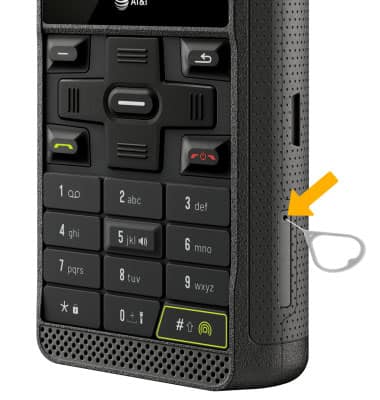
The SIM tray is located on the bottom right side of the device. To insert a SIM or microSD card, insert a SIM tool into the small hole to eject the SIM & microSD tray.
Insert or remove a SIM
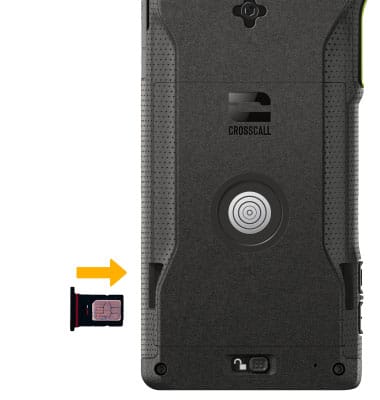
With the device facing down, insert or remove the Nano-SIM card into the SIM tray with the gold contacts facing up and the notched edge on the top left. Gently press the SIM card in until it clicks into place.
Note: Do not touch the gold contacts on your SIM card as it could damage the card.
Insert or remove a microSD card
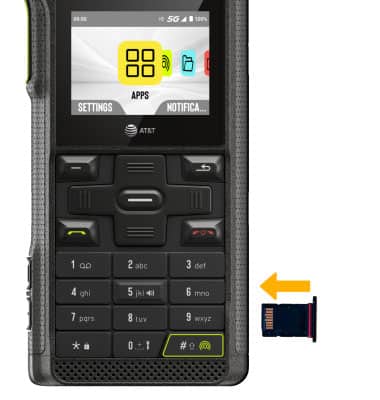
With the device facing up, insert or remove the microSD card into the SIM tray with the gold contacts facing down and the notched edge on the bottom left. Gently press the microSD card in until it clicks into place. Note: Do not touch the gold contacts on your SD card as it could damage the card.
Storage
Internal Memory: Up to 64GB
External Memory: Up to 1024GB