 To access Visual Voicemail, you must have already
 In this tutorial, you will learn how to:
• Access & listen to a Voicemail
• Access Voicemail options
When a new voicemail is received, the  Voicemail icon will appear in the Notification bar.
Access & listen to a Voicemail
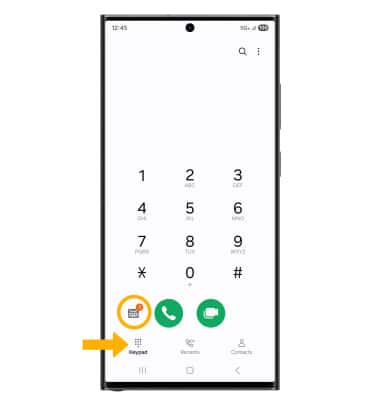
From the home screen, select the  Phone app.
ACCESS: Select the Keypad tab, then select the Visual Voicemail icon.
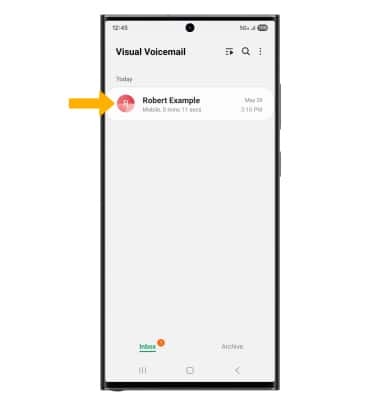
LISTEN: Select the desired voicemail.
Access Voicemail options
Select the corresponding icon.
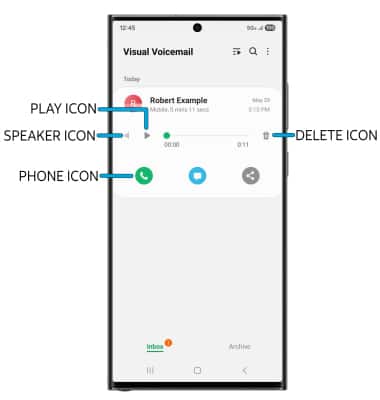
• PLAY/PAUSE: Select the Play icon to play the message. Select the Pause icon to pause the message.
• SPEAKER: Select the Speaker icon to enable or disable speaker mode.
• CALL BACK: Select the Phone icon to call back the phone number.
• DELETE: Select the Delete icon to delete a voicemail.
ADDITIONAL OPTIONS: Select and hold the desired voicemail, then select the desired option.
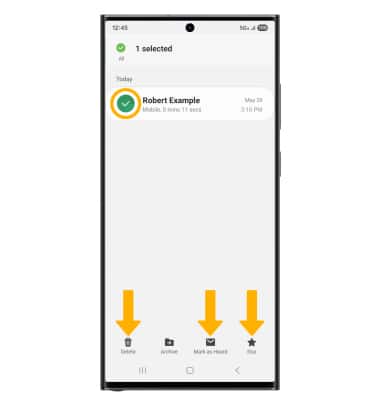
• DELETE: Select Delete to delete the voicemail. Select Delete again to confirm.
• MARK AS HEARD/UNHEARD: Select Mark as Unheard, then select OK to confirm.
• STAR: Select Star to star a voicemail, then select OK to confirm.
Note: View Access voicemail messages for tips to manage your voicemail. Go to Troubleshoot Voicemail for solutions to common voicemail problems.
• MARK AS HEARD/UNHEARD: Select Mark as Unheard, then select OK to confirm.
• STAR: Select Star to star a voicemail, then select OK to confirm.
Note: View Access voicemail messages for tips to manage your voicemail. Go to Troubleshoot Voicemail for solutions to common voicemail problems.