
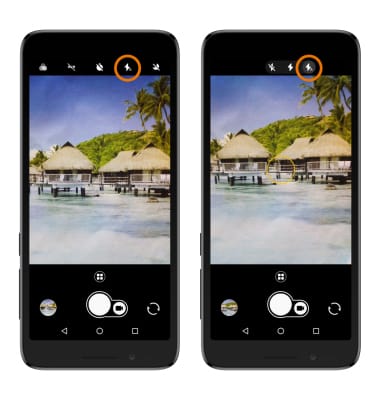
- TURN ON/OFF FLASH: From the Camera app, select the Flash icon to cycle through flash on, flash off, or auto flash.
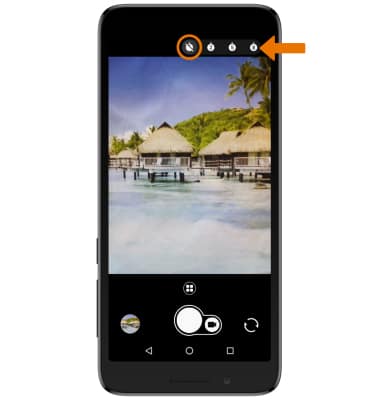
- SET A TIMER: Select the Timer icon then select the desired time.
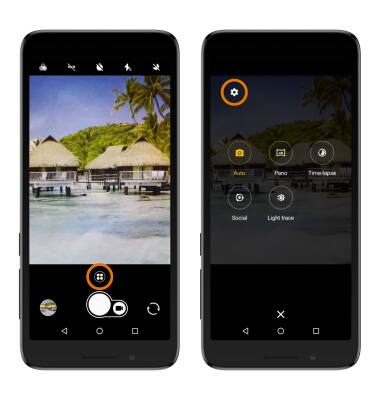
- ACCESS ADDITIONAL CAMERA SETTINGS: From the Camera app, select the Mode Icon > Settings icon.
- SET STORAGE LOCATION: From the Settings screen, select Storage then select the desired storage location.
Note: Storage location is only accessible if an SD card is installed.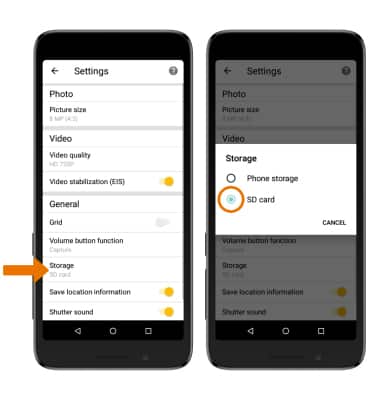
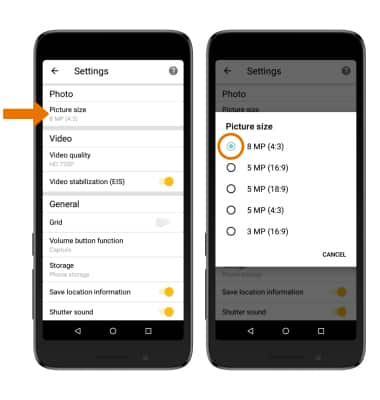
- CHANGE PICTURE SIZE: From the Settings screen, select Picture size, then select the desired size.
Camera & Video Settings
Alcatel idealXtra (5059R)
Camera & Video Settings
Manage camera and video settings including flash, storage location, timer, picture size, and voice commands.
INSTRUCTIONS & INFO

To access the Camera app, from the home screen select the Camera app. Alternately, press the Power/Lock button twice or from the lock screen swipe up twice on the Camera icon.