Order within 30minutes for fastest shipping option.
Quantity
Overview
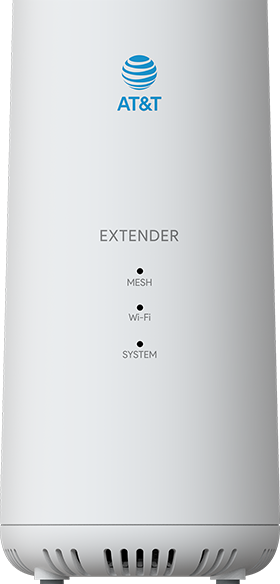
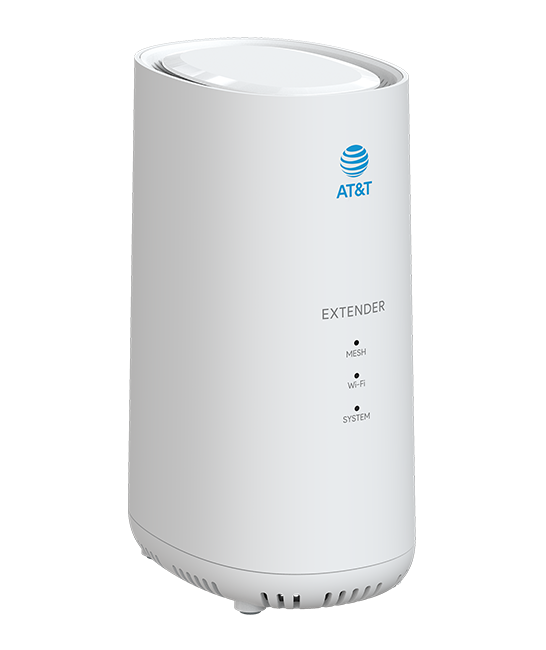
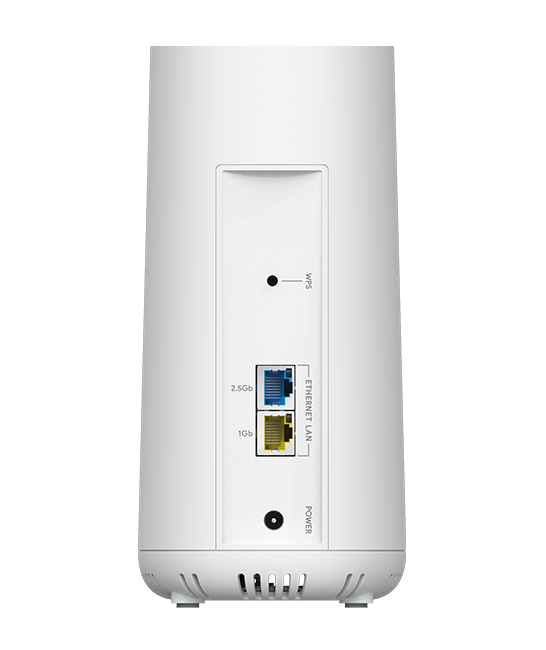
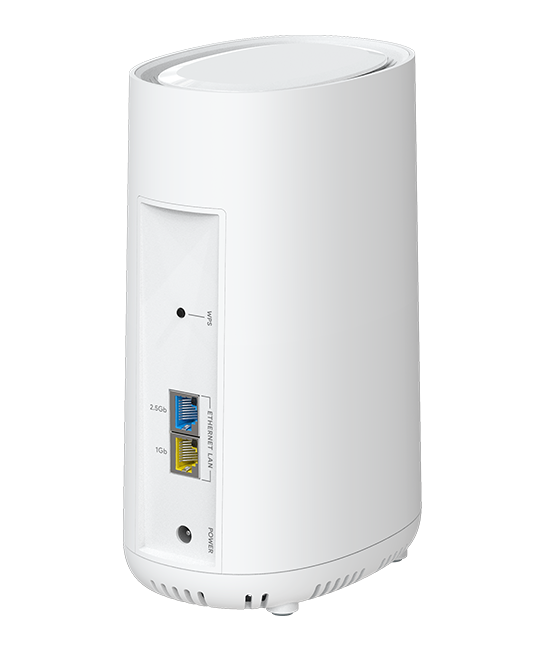
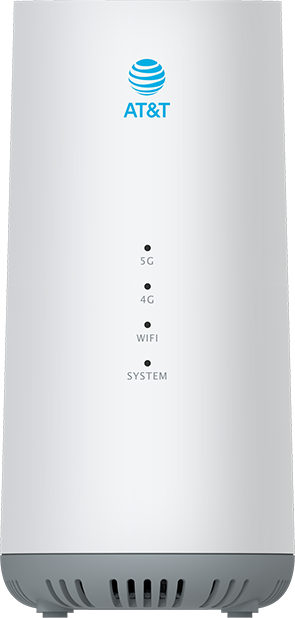
Expand the reach of your AT&T Internet Air™ for Business 5G Gateway quickly and seamlessly with the AT&T Wi-Fi Extender. Above and beyond your off-the-shelf extender, the AT&T Wi-Fi Extender is purpose built for easy one-touch setup and enhanced compatibility to expand your mesh network up to 2800 additional square feet. Even better, thanks to EasyMesh technology, feel free to roam the office without the hassle of switching Wi-Fi networks. It just works. Connect up to three Extenders* within 30 feet of your 5G Gateway to add up to 2800 square feet of additional coverage. Move effortlessly throughout the office without having to reconnect. Setup wirelessly with the WPS (Wi-Fi Protected Setup) button or by wire with ethernet. Meet the unique needs of your office by pairing directly with the 5G Gateway or by pairing extenders together to form a chain. View and manage your AT&T Wi-Fi Extenders all in one place on the Web UI from your AT&T 5G Gateway.
Features: • Wi-Fi 7 ready • Two ethernet ports, 2.5GbE x1 and 1GbE x1 • EasyMesh capable • Extends up to 2800sqft. • Software updates over the air • Designed for AT&T Internet Air™ for Business 5G Gateway
*Connection with AT&T Internet Air™ for Business 5G Gateway required. Gateway and internet service sold separately. 5G available only in 5G coverage areas. Network performance and internet speeds may vary due to proximity, connection method, or number of extenders connected. No more than three extenders recommended.
of 25 AT&T Internet Air for Business WiFi Extender reviewers recommend this product
HIGH RATING
Rated 5 out of 5 stars with 5 reviews
5.05
JerryKu
6/22/2026
Wifi extender
It was very easy to install and it reaches all areas of the house.
Helpful?
LOW RATING
Rated 1 out of 5 stars with 5 reviews
1.05
PearlandTX
5/10/2026
Did not work
The extender did not sync with current ATT Business Internet Air Router. Called customer service few times and had calls lasting hours but they could not figure it out. For the return they made me jump through hoops. Finally got it returned back at UPS store and now just waiting on the credit. Most likely will have to call and go through hour long phone call just to get the credit for the return.
Helpful?
Reviews
Rating snapshot
Select a row below to filter reviews
5 starsstars
9
9 reviews with 5 stars.
4 starsstars
2
2 reviews with 4 stars.
3 starsstars
2
2 reviews with 3 stars.
2 starsstars
2
2 reviews with 2 stars.
1 starstars
40
40 reviews with 1 star.
Overall Rating
1.9
5 out of 25 (20%) reviewers recommend this product
Review this Product
Select to rate the item with 1 star. This action will open submission form.
Select to rate the item with 2 stars. This action will open submission form.
Select to rate the item with 3 stars. This action will open submission form.
Select to rate the item with 4 stars. This action will open submission form.
Select to rate the item with 5 stars. This action will open submission form.
Adding a review will require a valid email for verification
Summary of Reviews
AI-generated from customer ratings & reviews, and may include incentivized reviews.
Customers report persistent connection failures, drops, and non-functionality across multiple devices and troubleshooting attempts
Many describe incompatibility with Fiber Optic Internet without receiving advance warning before purchase
You can type a maximum of 250 characters.
0/250 maximum
Average customer ratings
Design
Design, 2.5 out of 5
2.5
Features
Features, 1.9 out of 5
1.9
Performance
Performance, 1.7 out of 5
1.7
Filter Reviews
use with phone
returns
price
wi-fi
for business use
purchase
customer service
use with apple devices
Filters
Sort by
Most recent
1 to 4 of 55 reviews .
1 – 4 of 55 reviews
1 out of 5 stars.
Won't connect to my router
15 days ago
Is well built and powered up fine, but would not mesh. Went to AT&T store who just gave me another router and told me to return this extender. Staff very helpful and pleasant, but would have preferred to just have the extender do what it was advertised to do.
Helpful?
Response from AT&T:
a day ago
AT&T CARE - Pablo
Hello, Bill W001. Thanks for confirming that you got a new router as a replacement and the defective extender was successfully returned. However, we're sorry to hear your new AT&T Internet Air for Business WiFi Extender didn't deliver the top-tier quality and performance you expected right out of the box.
For any help with your AT&T service, you can always DM us directly on X (@ATTHelp), Instagram (@att), or Facebook (AT&T). Thank you for choosing AT&T!
1 out of 5 stars.
Do not buy
18 days ago
I've been struggling with this thing for the past year, I've failed college exams because of the darn thing cutting out on my PC for no reason, it isn't a computer issue, it works faster using the hotspot on my darn phone and it had zero issues back when I when I could have my PC closer to the actual router, I've done EVERYTHING to try and fix it, resetting it, connecting to ethernet, resetting my network settings, unplugging the wifi to the HOUSE and this darn thing STILL refuses to work ONLY on my PC, it works great on everything else, but craps out on my PC and ONLY my PC for no reason, It’s made doing schoolwork and job hunting a complete NIGHTMARE, do. NOT. Buy this piece of junk or get an AT&T router unless you're desperate, because this thing has been a massive pain.
No, I do not recommend this product.
Helpful?
Design
Design, 2.0 out of 5
2.0
Features
Features, 1.0 out of 5
1.0
Performance
Performance, 1.0 out of 5
1.0
Response from AT&T:
8 days ago
AT&T CARE - Kevin
Hello. We understand how critical a stable connection is for your college exams and for getting a job opportunity. Since the device works on other hardware, this points to a specific compatibility issue between the extender and your computer's network. We want to help you troubleshoot this specific connection issue directly so you can get back to your schoolwork without further interruption. Please contact us through social medica so we can offer you the assistance you need.
X (Twitter) at @ATTHelp, Facebook at AT&T or Instagram at @att
800‑331‑0500 (or dial 611 from your AT&T phone)
5 out of 5 stars.
Wifi extender
2 months ago
It was very easy to install and it reaches all areas of the house.
Helpful?
5 out of 5 stars.
Works Well
2 months ago
Fast shipping from At&t. Extender was super easy to setup and seems to work well in my house helping stabilize and strength my WiFi setup seamlessly.
Start typing your question and we'll check if it was already asked and answered.
1 - 10 of 12 questions
Sort by
Featured questions first
Q: Is this the airties 4971 extender?
8 days ago
0 Answers
Q: is there a model available that doesnt require internet air for business account, I have at&t residential air
2 months ago
0 Answers
Q: Can you use this for home internet
5 months ago
1 Answer
A: Hi there! 👋
Great news! We definitely offer Internet Air for residential homes! It’s fast, flexible, and easy to love. Check out the perks:
⚡ Complete Wi-Fi coverage throughout your home.
🛠️ Simple setup with zero installation costs.
💸 No contracts or hidden overage fees.
🛡️ AT&T Guarantee. We credit your bill if there's an outage!
See if your home is eligible here: 🔗https://www.att.com/internet/internet-air/
5 months ago
Helpful?
Q: Is it dual band?
9 months ago
1 Answer
A: Thank you for the question. Yes, the AT&T Internet Air for Business Wi-Fi Extender is Wi-Fi 6 ready and supports dual-band technology.
9 months ago
Helpful?
Q: How many boosters can I set up in my house
a year ago
1 Answer
A: The number of Wi-Fi extenders needed depends on the size and construction of your home. The Wi-Fi Extender Recommender Tool can help determine the optimal number based on your specific needs. Generally:
- One extender is recommended for homes under 3,000 sq. ft. or with 2 floors.
- Two extenders are suitable for homes between 3,000 and 4,000 sq. ft. or with 3 floors.
- Three extenders are recommended for homes larger than 4,000 sq. ft.
If more than three extenders are needed (rare), additional troubleshooting may be required after installation. You can add up to two additional extenders through the Smart Home Manager app, for a total of five. Starting with one extender is advised, and the Smart Home Manager may suggest more extenders at no additional cost.
a year ago
Helpful?
Q: does this business wifi extender work with residential fiiber gateway?
a year ago
0 Answers
Q: Does this work with AT&T All-Fi wireless router?
a year ago
0 Answers
Q: Does it work with a Model: Nokia BGW320-505. I have Internet 1000
a year ago
0 Answers
Q: Can I buy The wi-fi extender for business at a retail store ?
Anonymousa year ago
0 Answers
Q: Does this work with ps5 and other gaming systems?
2 years ago
1 Answer
A: This device is only compatible with the AT&T Internet Air Business Gateway, using AT&T Internet Air for Business service. Theoretically it would be able to provide service to any wifi-capable device in your location within range; however if you do have AT&T Internet Air for Business and plan to use it to play video games, you may want to look over your Terms of Service document.
We use cookies to help enhance your experience on our site and for analytics. We also may use cookies for marketing purposes. You can manage your preferences and opt out of the sharing for targeted advertising and sales of cookie data.
Learn more about our approach to privacy at att.com/privacy.