Using Interactive Widgets on Your Home or Lock Screen
iPhone XR
Using Interactive Widgets on Your Home or Lock Screen
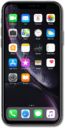
Interactive Widgets enable users to carry out app functions directly from the widget without opening the app.
1.
From the Home Screen, touch and hold on the screen.
2.
Tap Edit.
3.
Tap Add widget.
4.
Tap on a widget you would like to add to a home screen and select the size you would like.
For this tutorial we will be selecting the Music widget. Some widgets only have one size or options so tapping on them may not do anything.
5.
Tap Add Widget or tap and hold the widget to move it to the home screen and position you would prefer.
6.
Tap Done.
7.
You've completed the steps!
