Mobile Hotspot
Mobile Hotspot
In this tutorial, you will learn how to:
• Turn mobile hotspot on/off
• View mobile hotspot network name & connected devices
• Configure hotspot settings
When Mobile Hotspot is enabled, the  Mobile hotspot icon will be displayed in the Notification bar.
Turn mobile hotspot on/off
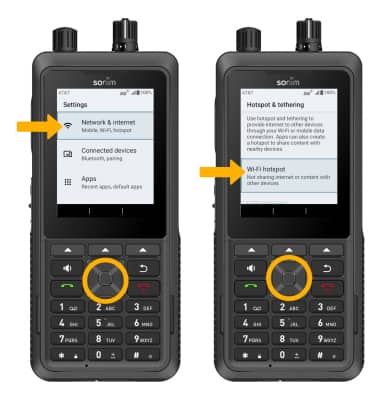
- From the home screen, press the Center Dynamic key to access the Menu. Press the navigation keys to highlight the
 Settings app then press the Select button.
 - Press the navigation keys and then the Select button to select Network & internet > Hotspot & tethering > Wi-Fi hotspot.
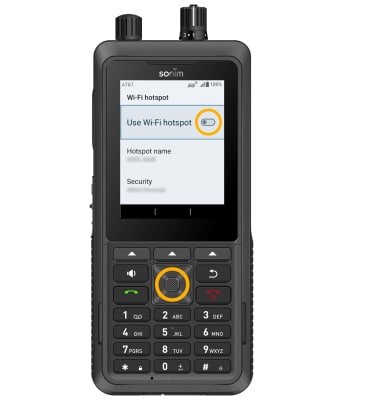
3. Press the Select button to turn the Use Wi-Fi hotspot switch on or off.
Note: If Wi-Fi is turned on, you will be prompted to press the Right Dynamic key to select OK.
View mobile hotspot network name & connected devices
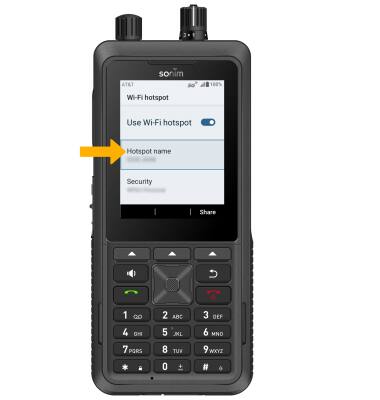
VIEW MOBILE HOTSPOT NETWORK NAME: The Hotspot name is displayed on the Wi-Fi hotspot screen.
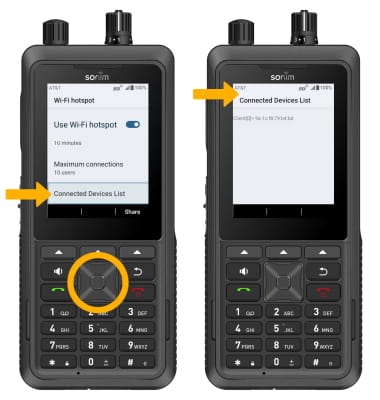
VIEW CONNECTED DEVICES: Press the navigation keys to highlight Connected Device List, then press the Select button. Connected devices will be displayed.
Configure hotspot settings
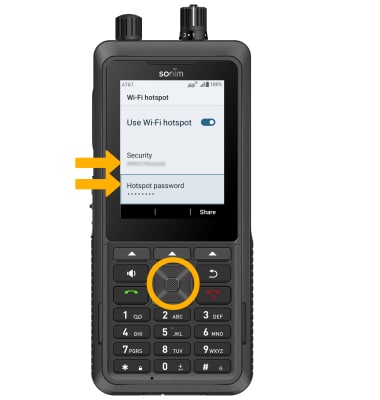
From the Mobile hotspot screen, press the navigation keys to highlight the desired setting to configure and press the Select button to edit. You can configure the Hotspot name, Security, and Hotspot password from this screen.