Find IMEI, Phone & Serial Number
CORE-P6
Find IMEI, Phone & Serial Number
Locate your device's IMEI, serial number, and phone number.
In this tutorial, you will learn how to:
• View phone number
• View serial number
• View IMEI number
View phone number
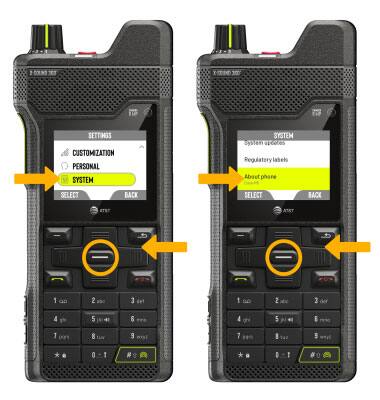
- From the home screen, press the right navigation key to highlight the
 Settings app, then press the Select button to select.
 - Press the navigation keys to scroll to and highlight System, then press the Select button. Press the navigation keys to scroll to and highlight About phone, then press the Select button.
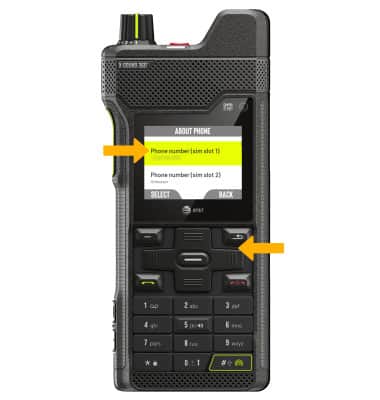
3. Press the navigation keys to scroll to Phone number. The phone number will be displayed.
View serial number
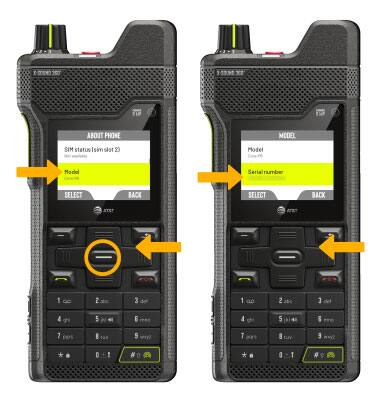
From the About phone screen, press the navigation keys to scroll to and highlight Model, then press the Select button. Press the navigation keys to scroll to view the device's Serial number.
Note: You can also view your serial number by entering *#06# from the keypad.
View IMEI number
From the About phone screen, press the navigation keys to scroll to and view the IMEI number.
Note: Alternately, type “imei” in the Setting search. You can also view your IMEI by entering *#06# from the keypad.