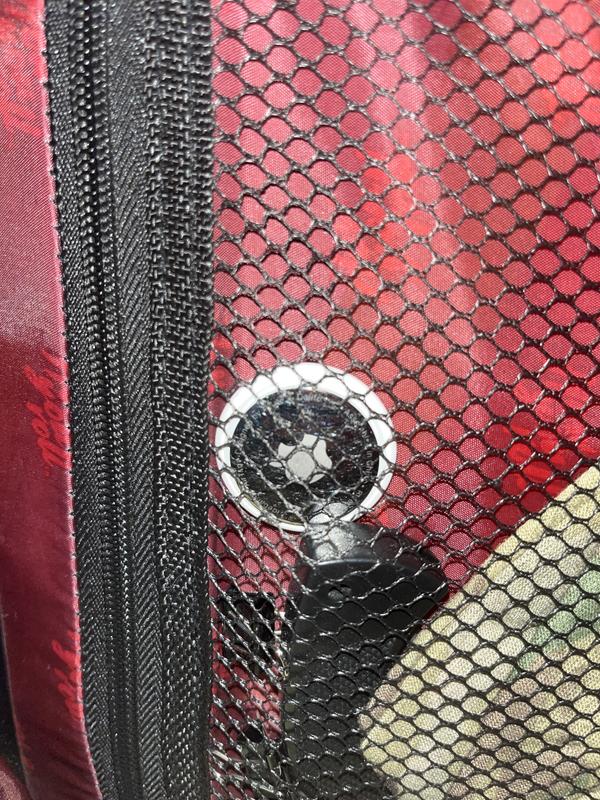
AirTag is a supereasy way to keep track of your stuff. Attach one to your keys, slip another in your backpack. And just like that, they’re on your radar in the Find My app, where you can also track down your Apple devices and keep up with friends and family.
Misplacing something like your wallet doesn’t have to be a big deal when it has AirTag attached. You can play a sound on the built-in speaker by going to the new Items tab in the Find My app, or say “Hey Siri, find my wallet.” If it’s hiding nearby—like under the couch or in the next room—just follow the sound and your search is over. If your AirTag is nearby, your iPhone can lead you straight to it with Precision Finding. You‘ll see the distance to your AirTag and the direction to head in—all thanks to Ultra Wideband technology.
When you've left something far behind, like at the beach or the gym, the Find My network—hundreds of millions of iPhone, iPad, and Mac devices around the world—helps track down your AirTag. And it's designed to protect your privacy every step of the way. How does it work? Your AirTag sends out a secure Bluetooth signal that can be detected by nearby devices in the Find My network. These devices send the location of your AirTag to iCloud—then you can go to the Find My app and see it on a map. The whole process is anonymous and encrypted to protect your privacy. And it's efficient, so there's no need to worry about battery life or data usage.
Just like your other Apple devices, AirTag can be put into Lost Mode. Then, when it’s detected by a device in the network, you’ll automatically get a notification. You can also set it so someone can get your contact info by tapping your AirTag with an NFC-capable smartphone—that’s the same technology that lets people pay for things with their phones.
Only you can see where your AirTag is. Your location data and history are never stored on the AirTag itself. Devices that relay the location of your AirTag also stay anonymous, and that location data is encrypted every step of the way. So not even Apple knows the location of your AirTag or the identity of the device that helps find it.
A one-tap setup instantly connects your AirTag with your iPhone or iPad. Enter a name for your AirTag, attach it to the item you want to track, and you're good to go. Want AirTag notifications on your Apple Watch, too? No problem.
of 15 Apple AirTag reviewers recommend this product
HIGH RATING
Rated 5 out of 5 stars with 5 reviews
5.05
Talitha - recommended this product
10/14/2021
Love these!!
I love these!!! So easy to set up and easy to find with the find my app. Better price than other options out there that I’ve tried also.
Helpful?
LOW RATING
Rated 1 out of 5 stars with 5 reviews
1.05
Daisy Paisley
8/14/2025
Stuck with an air tag that doesn’t work
As soon as I got it it didn’t work so I called customer service about 7 different occasions to get a return label and they wouldn’t give me one told me to go to AT&T store to return it so I did and they wouldn’t take it either they told me to go to an Apple store so here I am stuck with an AirTag I don’t want and that doesn’t work
Helpful?
Reviews
Rating snapshot
Select a row below to filter reviews
5 starsstars
32
32 reviews with 5 stars.
4 starsstars
4
4 reviews with 4 stars.
3 starsstars
1
1 review with 3 stars.
2 starsstars
1
1 review with 2 stars.
1 starstars
22
22 reviews with 1 star.
Overall Rating
3.4
7 out of 15 (47%) reviewers recommend this product
Review this Product
Select to rate the item with 1 star. This action will open submission form.
Select to rate the item with 2 stars. This action will open submission form.
Select to rate the item with 3 stars. This action will open submission form.
Select to rate the item with 4 stars. This action will open submission form.
Select to rate the item with 5 stars. This action will open submission form.
Adding a review will require a valid email for verification
Hello there!\nWe're sorry to hear that the Apple Air Tags didn't meet your expectations. We understand the importance of having reliable and functional products to locate your belongings, and we apologize for not offering that this time. \nAs this is a product manufactured by Apple, they offer a one-year limited warranty directly through them. For warranty support, product exchanges, or repairs, we recommend reaching out to Apple Support or visiting your nearest Apple Store with your Air Tags and proof of purchase.\n\nIf you need help finding your invoice or purchase details, please check your original order confirmation email or your purchase history with the retailer. For more information about Apple’s warranty and support process, please visit Apple’s Service and Support.\n\nWe appreciate your feedback and hope Apple can resolve this quickly for you.
A: Yes, the iPhone 13 Pro Max is compatible with Apple AirTags. AirTags work with any iPhone capable of running iOS 14.5 or later, including the iPhone 13 Pro Max, which supports the advanced features of Precision Finding
A: Hi @Yep ya huh,
It has wide-band technology which allows it to be tracked further than what a regular Bluetooth connection allows. Also, based on online research, it can use other nearby iPhones to share locations.
ChrisZ, AT&T Community Specialist
4 years ago
Helpful?
Q: If my dog has a shock collar on will the AirTag & collar have any interference?!
A: Morning @Ashlee1980,
Unfortunately, that is a question beyond our expertise. It should not cause any issues but shock collars are electronics beyond our knowledge.
ChrisZ, AT&T Community Specialist
4 years ago
Helpful?
Q: What if my luggage with an air tag went to Houston, and I went on to Seattle? Could I locate my air tag that far away? What is its radius?
A: Hi @AndOne45,
It uses Bluetooth to track. The band it uses is a bit stronger but not strong enough to track long distances as you have described. From what I read online, it can use other nearby iPhones to ping location.
ChrisZ, AT&T Community Specialist
We use cookies to help enhance your experience on our site and for analytics. We also may use cookies for marketing purposes. You can manage your preferences and opt out of the sharing for targeted advertising and sales of cookie data.
Learn more about our approach to privacy at att.com/privacy.