5 types of internet connections: cable, fiber, 5G, and more
Learn more
Five types of internet connections
Info at a glance
- What are the five types of internet connectivity?
- What is an internet connection?
- What does broadband mean?
- Comparing different types of internet services
- Internet for how you live
- How can I find out what type of internet connection I have?
- Finding affordable internet options
- How to choose the right internet connection for you
- Get started with the internet connectivity you need
What are the five types of internet connectivity?
There are many ways to get online, so deciding which internet connection type is right for you can feel confusing. The most important factors that can help you choose are knowing what you need for online activities (work, streaming, gaming, school) and what’s actually available in your neighborhood.
There are five types of internet connectivity:
- DSL (Digital Subscriber Line): Uses phone lines. Still around in some more rural areas, usually the slowest of the modern options.
- Cable internet: Uses the same coaxial cables as cable TV. Often a fast internet connection and widely available.
- Fiber internet: Uses fiber-optic cables. Typically, the fastest and most reliable, with strong upload and download speeds.
- Satellite internet: Connects via satellites in orbit. Helpful in rural or remote locations.
- 5G home internet: Delivers a wireless internet connection using 5G (and sometimes 4G LTE) cell networks and a wireless gateway instead of a wired line.
Each of these internet services has its own strengths, but they all share a common goal: to provide an internet connection to your home. You may have options for the types of internet connectivity available at your address, or you may have access to just one right now.
A good place to start to understand the type of service you can expect—and if you have choices, to choose the best fit—is with the basics in what an internet connection is.
What is an internet connection?
Think of an internet connection as the link between your home and the rest of the online world. Your provider sends data from a server to your devices (downloads) and you send data to the server through your activity (uploads).
Browsing the web through your web browsers, like Google Chrome and Microsoft Edge, streaming music and movies, and online gaming through the cloud (the server where data lives) all rely on having an internet connection.
The internet comes into your home through either a wired connection or a wireless one. It reaches your gateway, router, or modem, which then sends data to your wired devices through cables (like to your smart TV) or wireless devices over Wi-Fi.
Internet vs. Wi-Fi:
- These terms are often confused, but they’re not the same.
- Internet is the service you buy from a provider—your actual connection to the online world.
- Wi-Fi is how your internet connection is shared wirelessly inside your home through a router or gateway.
- Internet and Wi-Fi work together to bring connectivity into your home or business.
There are two general types of internet: narrowband and broadband. Think of narrowband as traditional dial-up internet. Broadband refers to modern high-speed internet connectivity.
What does broadband mean?
Broadband is a catch-all term for high-speed, always-on internet that’s faster than dial-up. In the U.S., the Federal Communications Commission (FCC) sets a broadband speed and bandwidth benchmark. It typically includes fiber, 5G home internet, cable, satellite, and some DSL.
It can also be mobile, called mobile broadband, which is how mobile hotspots connect to the internet for connectivity on the go.
Broadband is the standard for high-speed internet and refers specifically to the speed and bandwidth of your connection. While broadband tells you how fast the service is, terms like fiber or cable describe the equipment and lines used to deliver it to your home.
How do you plan to use the internet and where? Are you looking for an internet connection in your home or business, in the city or rural areas, or are you trying to connect on the go? Understanding how they differ can help you choose between the options available at your address.
Comparing different types of internet service
When people talk about “types of internet connections,” they’re usually asking about:
- Fiber internet
- 5G home internet
- Cable internet
- Satellite internet
- DSL
Each comes with its own strengths, tradeoffs, and ideal use cases. Understanding each type of internet connection can help you decide which service is best for you.
1. Fiber internet
Fiber internet uses fiber-optic cables that move data as pulses of light. It delivers extremely fast, consistent speeds. Because it’s usually buried underground, it’s less affected by weather and less exposed to potential vandalism than other types of internet connectivity.
- Speeds: Often start in the hundreds of Mbps and can reach multi-gigabit levels.
- Pros: Typically, the fastest and most reliable option; many plans offer symmetrical speeds, so upload speed can match download speed—a big deal for video calls, content creation, and cloud backups.
- Cons: Not yet available everywhere, though coverage is quickly growing.
AT&T Fiber® internet is ideal for households that want powerful home internet with the flexibility to choose between speed plans to fit your needs.
Read: What is fiber internet? How it works, benefits & more
2. 5G home internet
5G home internet, also known as fixed wireless, doesn’t require digging or wiring. A wireless gateway in your home connects to nearby 5G (and sometimes 4G LTE) towers and then broadcasts a Wi-Fi connection.
- Speeds: In strong coverage areas, you might see speeds from tens of Mbps into the hundreds—enough for high-definition (HD) streaming, video calls, and everyday browsing.
- Pros: Simple setup, great for renters, and a strong option when wired choices are limited.
- Cons: Availability is still expanding, and performance can vary based on signal strength and network traffic.
5G home internet is a great alternative if you live in a rural area or don’t have access to fiber. You stay connected with fast, reliable speeds on our powerful 5G network—all with easy self-setup and no digging for installation.
3. Cable internet
Cable internet uses coaxial cables (the same kind used for cable TV) to bring internet into your home. A modem connects to that cable line, and your router or gateway handles Wi-Fi.
- Speeds: Typically ranging from around 100 Mbps to the gigabit range, with lower upload speeds.
- Pros: Widely available; usually fast enough for streaming, gaming, and working from home.
- Cons: You share bandwidth with nearby homes, so speeds can dip during busy times, and users may experience slower uploads when sending large files or streaming live.
While cable has long been a standard, in many areas fiber and 5G home internet/fixed wireless is growing as the modern internet connectivity option. Cable can also be prone to weather, environmental interference, and other disruptions.
Read: Fiber vs. Cable: What is the Difference?
4. Satellite internet
Satellite internet uses a dish at your location to talk to satellites in orbit, which then connect to ground stations on earth and the rest of the internet.
- Pros: Ideal for rural or remote locations where reliable fiber, 5G home internet, cable, or DSL aren’t available.
- Cons: Satellite requires an unobstructed view of the sky. Also, it has higher latency (delay), as well as potential data caps or slower speeds during busy periods.
Satellite internet isn’t new. However, newer low-earth orbit (LEO) satellite services can offer higher speeds and reduced latency compared to older satellite internet, but it still has a higher latency than fiber or cable.
5. DSL (Digital Subscriber Line)
DSL uses existing telephone lines to deliver internet connectivity. It’s always on, but generally slower than newer options.
- Where it fits: Suitable for lighter use in areas where cable, fiber, or 5G home internet has not yet arrived.
- Where it struggles: Multiple HD streams, large downloads, or heavy remote work can exceed the limits of DSL.
Many providers are gradually moving away from DSL and investing in faster networks instead. If you’re on DSL now, it’s worth checking whether you can upgrade to a more modern internet connection type.
Your internet connection is important at home, at work, or wherever you go. Knowing what’s available for how you live and where you live is just as important.
Internet for how you live
The type and speed of the internet you need depends on your lifestyle. In most cases, fiber is the best option for fast, reliable internet connectivity—and its availability is growing. Fiber provides the fastest, most flexible options, as well as symmetrical uploads and downloads for large files. This includes:
- Work-from-home professionals and content creators
- Homes that stream or download movies, especially if you have multiple people using your internet at the same time
- Competitive gamers and online gaming enthusiasts

Remember that 5G home internet is a great option where fiber internet options are limited. This includes:
Rural households
Satellite and 5G home internet (where available) are often a go-to when wired networks don’t reach your address.
Avid travelers
If you’re on the go or traveling, lean on mobile data and connected Wi-Fi car plans, which are available for a range of makes, your connection can travel with you.
Wireless mobile connectivity
Wireless mobile hotspots enable you to connect other devices to the internet through your hotspot-enabled device, like a smartphone or tablet. You can also purchase a separate hotspot device. Mobile hotspots are a great choice for traveling to provide connectivity for your devices, and devices of people traveling with you.
There are ways to stay connected at home and places that you visit. Because there are many choices, it’s easy to not know which type of internet connectivity you have in your home.
How can I find out what type of internet connection I have?
Not sure which type of internet you’re currently using or if it’s fast enough for your needs? Try these steps to find out:
- Check your bill or online account. Your plan name may say, “fiber,” “DSL,” “5G,” “wireless,” or similar.
- Look at your equipment. The method your internet uses to connect to your wall is an indicator for the type of internet connection you have. For example:
- Coax connector → likely cable
- Phone jack → often DSL
- Optical terminal → usually fiber
- Gateway with a SIM → typically 5G or LTE home internet
- Ask your provider to confirm your connection type and any upgrade options at your address.
If you’ve experienced buffering or your internet connectivity seems to be lagging:
- Run a speed test to see what your connection actually delivers in real-world conditions. If you’ve experienced slow speeds, lagging, or buffering, a speed test can help you learn if you may need to upgrade your internet service plan.
You know which type of internet you have and if your current speed meets your needs. It’s time to see what fits your lifestyle and budget.
Finding affordable internet options
On a tight budget? We’ve got you covered! Our affordable internet solutions help eligible households and students get reliable internet. For fiber, we offer a 100 Mbps plan that delivers high-speed internet at budget-friendly prices.
To save even more, new and existing AT&T Wireless customers can save with internet + wireless bundles. What are your next steps?

How to choose the right internet connection for you
Choosing a connection isn’t just about chasing the fastest speeds. Where you live, what’s available in your area, how you use the internet, and how many people and devices your connectivity is supporting all drive your decision. To know your options and the best fit for you, ask yourself:
1. What’s available in my neighborhood?
2. How many people are online at once?
- Mostly emails, browsing, and casual streaming? Each of the internet connection types may work for you. However, you’ll have better reliability with fiber internet or 5G home internet.
- Multiple 4K streams, gaming, and video meetings? Stick with fiber and 5G home internet for the speed, reliability, low latency, and higher bandwidth.
3. How much speed do you need?
- If you’re choosing fiber, we offer several plans to the meet the best internet speed to match your budget and usage.
- When uploads matter to you, like if you send large files, livestream, or are a professional gamer, fiber leads the way for fast, symmetrical speeds.
These answers will tell you whether your current connection can keep up—or if it’s time to upgrade.
Get started with the internet connectivity you need
Now, you’re empowered to understand the types of internet connections. Your next step is simple: discover what’s available at your address and match it to how you actually use the internet.
- Confirm which type of internet connectivity you already have
- Check the speed to see if it’s sufficient for your needs
- Explore which types of internet availability are at your address
- Visit us online to learn about the best internet plans and our internet deals. If you’re already an AT&T customer, use your AT&T app to sign up or upgrade your service.
We offer AT&T Fiber and AT&T Internet Air to keep you connectivity with fast, reliable internet. Choose the type of internet—and AT&T internet plan—that’s just right for the way you work, stream, game, and live.
More articles and information

AT&T cell phone and data-only plans
Learn more about our wireless phone plans and data plans. Compare pricing and features and find the best plan to fit your needs.
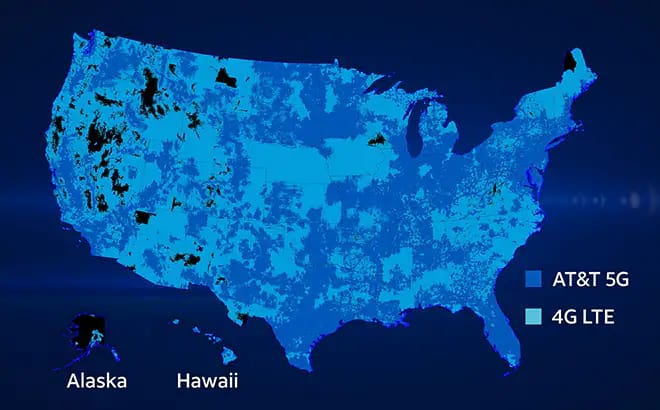
AT&T 5GSM network & coverage maps
Learn how to connect to our 5G network, which wireless plans include 5G access, and how to upgrade to a 5G-capable phone.

AT&T discount programs
Find out how to get discounts, savings, and benefits through your employer, organization, or school.