Benefits of Cellular Data Plans for Tablets, Including iPads | AT&T
Benefits of cellular data plans for tablets, including iPads
Info at a glance
- What are the benefits of a tablet cellular data plan?
- Do you want to use GPS on your tablet?
- Are there any drawbacks to cellular tablets?
- Wi-Fi-only vs. cellular-enabled tablets
- Is my tablet is cellular-enabled?
- Can I buy a tablet without a cellular plan?
- Pick the right cellular provider for your tablet
- Can I bring my own tablet to AT&T?
- How much does an AT&T cellular tablet plan cost?
- How do I add my tablet to my existing AT&T account?
- Can I finance an iPad or tablet through AT&T?
- Should I get my kid a tablet plan?
What are the benefits of a tablet cellular data plan?
The best part about cellular-enabled tablets is greater connectivity and portability—you’re not limited to Wi-Fi® network locations like with Wi-Fi-only tablets.
Having a tablet data plan gives you access to the internet from anywhere, so you can get so much more from your tablet.

Do you want to use GPS on your tablet?
Only cellular-enabled tablets offer live GPS. A Wi-Fi-only tablet can download offline maps from apps like Apple Maps, Google Maps, or Waze, but you won’t get real-time traffic updates (like speed trap notifications, accident reports, or faster route options). For robust GPS functions on a tablet, you’ll want a cellular data plan.
Will you use your tablet for mobile gaming?
If you're an avid gamer (or a vlogger or online influencer), a cellular connection provides you with a powerful mobile platform. You can upload photos and files, live-stream your action, and post to social media from nearly anywhere with a cellular data plan on your tablet.
Do you care about security?
Cellular data is generally more secure than your average Wi-Fi network—especially unsecured public Wi-Fi. Cybercriminals can exploit unsecured Wi-Fi networks to steal personal data, passwords, and banking details. If you regularly connect to public Wi-Fi networks, make sure you’re using a security app like AT&T ActiveArmorsm (free to AT&T customers), as well as a good VPN, to protect your personal information from hackers.. Keep in mind that this can burn through your smartphone’s data, though.
Are there any drawbacks to cellular tablets?
On average, cellular tablets cost more than their Wi-Fi-only counterparts.
First, there’s the device cost: cellular + Wi-Fi models cost more than their sibling Wi-Fi-only models. You don’t have to break the bank on a tablet—plenty of reasonably priced, cellular-enabled tablets are available these days.
Then there’s the cost of the tablet’s data plan, which vary in price from as low as $20.99/mo. (with an Unlimited data plan from AT&T; other carriers will have different plan costs).
If you don’t want the monthly cost of a separate data plan, you can tether your Wi-Fi-only tablet to a smartphone. Tethering turns your smartphone into a mobile hotspot. You can then use your smartphone data to connect your tablet to the internet via cellular connection. Keep in mind that this can burn through your smartphone’s data, though.
Wi-Fi vs. cellular-enabled tablets
Tablets that have both Wi-Fi and cellular connectivity offer a more robust experience, because you’re less likely to lose internet connectivity when you’re on the go.
Wi-Fi only tablets | Cellular + Wi-Fi tablets | |
|---|---|---|
On-the-go internet access | Where Wi-Fi available | More comprehensive, only limited in remote regions |
Security | Depends on Wi-Fi network configuration | More encryption |
GPS | Offline versions only | Available |
Device cost (same model) | Average $80.00 less | |
Plan cost | $0 | Minimum of $20.99/mo. |
Is my tablet cellular-enabled?
How to check if your tablet can use mobile data:
Enter your tablet’s IMEI number in our Bring Your Own Device portal. We’ll let you know if your tablet works with our network and how to activate it. Or, look for a SIM card slot along the side of the device. A SIM slot means you have a cell-capable tablet.
Look for an EID number under Settings > General > About (Apple) or Settings > About tablet > Settings (Android). And EID number means you can use eSIM to activate on a cellular network.
Apple iPad: Open Settings and look for an item labeled Cellular. If it’s there, your iPad is cellular-enabled. Android tablets: Open your Settings and look for Network & Internet or Connections. If you see Mobile data or Cellular network under these menus, your Android tablet is cellular-enabled.

Can I buy a tablet without a cellular plan?
Yes. If you’re planning on using your tablet mostly in places with secure Wi-Fi access (like at home), you might not need a data plan for your tablet.
Almost all tablets available today come in both cellular + Wi-Fi and Wi-Fi-only models. While AT&T only offers cellular + Wi-Fi tablets, Wi-Fi-only versions are available from your tablet manufacturer’s website.
If you buy a cellular + Wi-Fi tablet, but you aren’t ready to get a tablet data plan yet, you can use it without a cellular plan, and just use Wi-Fi for internet access.
Pick the right cellular provider for your tablet

Can I bring my own tablet to AT&T?
Yes, if your tablet is cellular-enabled and compatible with our network, you can bring your tablet or iPad to AT&T WirelessSM. AT&T Prepaid® also offers the option to bring your own device to a prepaid data plan.
If you bought your tablet from another carrier and are paying it off through a financing (installment) plan, it might be locked by that carrier. You might need to pay off the installment plan before bringing it to AT&T.

How much does an AT&T cellular tablet plan cost?
The cost of a tablet data plan depends on the wireless provider, the plan’s data allotment, and other factors. AT&T offers a variety of cellular tablet plans that can fit everyone’s specific needs and budget.
AT&T cellular tablet plans
AT&T Your Way data tablet plans
If you already have an AT&T Wireless account with at least one unlimited phone plan, you can get the AT&T Unlimited Your Way data plan when you add a tablet line to your account— unlimited data starts at $20.99/mo. (plus taxes and fees).
AT&T Unlimited Day Pass℠ for iPads
AT&T now offers unlimited short-term data-only plans for iPads. With this option, anyone (AT&T customer or not) can download an eSIM to their iPad and get unlimited data (AT&T may temporarily slow data speeds if the network is busy). For just $3 a day, you can stream, work, browse, and use all your favorite apps right on your iPad, so you can save your phone battery. And the best part is that there’s zero commitment. You pay only when you need it. No contracts, no credit checks, no overages — just one flat daily rate (requires an eligible unlocked, eSIM-capable iPad). 24-hour data activation begins shortly after purchase. Plus, get your first day pass on us! (Subject to change. First day pass on us with your initial eSIM activation. Limit one per tablet.)
This plan is ideal for parents or individuals heading out on a trip who need a limited-time data plan for their own or their kids' iPad. It works as a day pass for data, and can be renewed on a day-to-day basis.
Activating it is simple and done through your iPad’s settings.
AT&T standalone tablet plans
AT&T currently offers two DataConnect plans for tablets:
- 50GB data plan starts at $55/mo. for one line (plus taxes & fees)
- 100GB data plan starts at $90/mo. for one line (plus taxes & fees)
AT&T prepaid tablet plans
AT&T also offers several flexible prepaid data plans for tablets.
- 20GB 12-month data plan starts at $25/mo. (plus taxes & fees) when you pay $300 upfront for a year of service
- 15GB data plan starts at $35/mo. (plus taxes & fees)
- 50GB data plan starts at $55/mo. (plus taxes & fees)
- 100GB data plan starts at $90/mo. (plus taxes & fees)
There are a couple of different ways to add a tablet line to your existing AT&T account: you can buy a new tablet from AT&T or you can bring tablet that you already own. If you do opt to bring your own tablet, first make sure that your tablet is cellular-capable.
Add a line to existing account:
- Sign in to your AT&T account.
- Select Add a device, and then select if you’ll be bringing your own tablet or buying a new tablet.
- Select a data plan for your tablet, as well as any tablet accessories like keyboard and pens, headphones, or chargers.
If you’re purchasing a new tablet, you can opt to pick it up in-store or have it shipped to you.
Can I finance an iPad or tablet through AT&T?
Yes, if you buy a new tablet from AT&T and add a tablet line to your AT&T Wireless account, you can purchase it on an installment plan with low monthly payments. Installment plans typically last 36 months, so the cost of a tablet is spread out over three years of your monthly bill. And the best part? There’s no interest (APR) charged for AT&T’s installment plans, and you can pay off your device early without penalty.
Should I get my kid a tablet plan?
It depends—do you enjoy a bit of peace and quiet on long car trips or plane rides? A tablet with a cellular plan allows kids to access the internet and stay connected even when Wi-Fi is unavailable.
That said, if your kids mainly use their tablets for offline activities like watching downloaded shows, reading books, playing offline games, or using apps that don’t require a constant internet connection, then a Wi-Fi tablet might be enough for them.
Are tablets safe for kids to use?
A cellular plan offers more consistent access to the internet, which raises concerns about screen time and online safety. If you do want to purchase a tablet for a child, you’ll want to invest in a robust parental control system to help you monitor and manage online activities.
Some tablets are designed for kids, like AT&T amiGO Jr. Tab™, which offers filtered, kid-focused content. Parents can manage and adjust their tablet use using the free AT&T amiGO™ app.
Will you need to track data usage?
Be aware of your plan’s data limits and potential overage charges. Monitor your child's data usage to avoid unexpected costs—AT&T makes tracking data usage easy through your online account.
More articles and information

AT&T cell phone and data-only plans
Learn more about our wireless phone plans and data plans. Compare pricing and features and find the best plan to fit your needs.
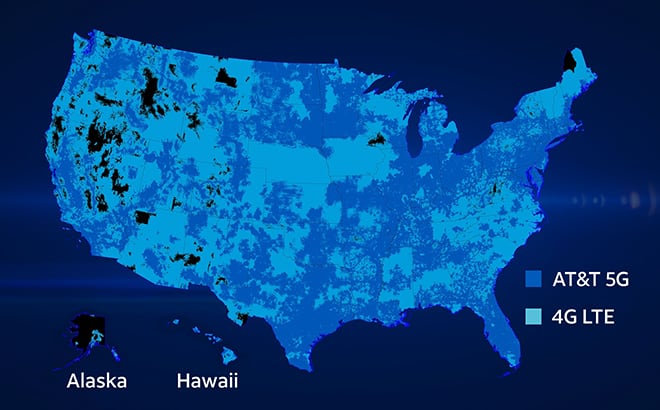
AT&T 5GSM network & coverage maps
Learn how to connect to our 5G network, which wireless plans include 5G access, and how to upgrade to a 5G capable phone.

AT&T discount programs
Find out how to get discounts, savings, and benefits through your employer, organization, or school.